
Accounts payable workflow at a glance
Processing supplier invoices is still associated with a significant amount of manual work in many companies.
Invoices arrive through various channels and must be captured, reviewed, approved, paid, and archived. With DeepBox and Abacus, this entire process can be digitized and largely automated.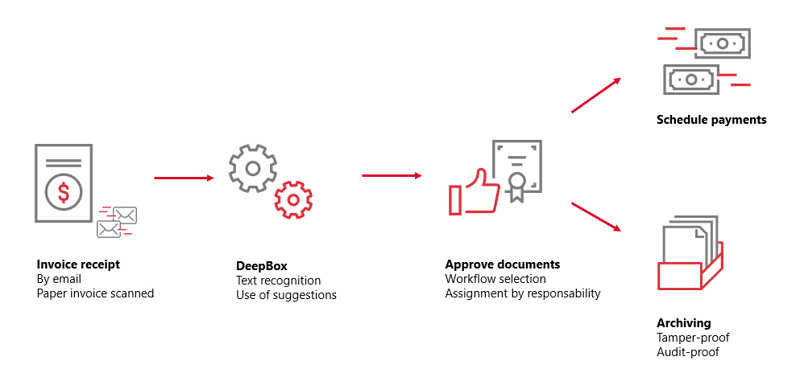
In the following four steps, we briefly explain what happens after an invoice is received.
1. Invoice receipt
The process begins when an invoice is received. Invoices may arrive electronically via email or physically by post.
Email invoices are forwarded directly to DeepBox. Paper invoices are scanned upon receipt and also stored in DeepBox. This ensures that all invoices enter a centralized digital intake channel.
The goal is to process all documents in a consistent and structured manner. This prevents documents from being lost and ensures invoices are available digitally at all times.
2. Automated processing with DeepBox
Once the invoice has been received, automation takes over a large part of the work.
DeepO's AI technology automatically identifies the document type and extracts relevant information such as supplier, invoice date, amount, and payment deadline. Based on predefined rules and previous postings, the system can also generate account assignment suggestions.
The invoice is then automatically recorded in the Abacus accounts payable module. This significantly reduces manual effort and minimizes potential errors.
3. Digital approval
Once the invoice has been recorded, the approval process begins.
The document is automatically assigned to a predefined workflow. Responsible approvers review the invoice and can approve or reject it. Approval can be completed digitally via MyAbacus or the AbaClik AI app.
Workflows can be configured flexibly and controlled based on criteria such as invoice amount, cost center, project, account, or area of responsibility. This ensures that every invoice follows the correct approval process.
4.1. Payment processing and execution
After approval, the invoice is prepared for payment.
Abacus automatically generates payment proposals based on stored payment terms and due dates. After review, payments can be executed directly through integrated e-banking.
Since payment transactions and accounting are fully connected, all entries are automatically updated and the entire process remains fully transparent and traceable.
4.2. Audit-compliant archiving
After processing, the invoice is archived in a legally compliant manner.
Documents are transferred to a digital archive and protected against subsequent modifications. Time stamps provide proof that documents have remained unchanged.
All process steps remain fully documented, and invoices can still be found quickly and easily years later.
Key benefits at a glance
The integration of DeepBox and Abacus enables the digitization of the entire accounts payable process. Administrative tasks are reduced while efficiency is sustainably increased. Companies benefit from greater transparency, faster processing times, fewer errors, and audit-compliant archiving.
As a result, invoice processing evolves from a largely manual procedure into a seamless, digital, and highly automated workflow.
Fidigit – Your partner for digital transformation
Electronic Banking with Abacus is more than just a technical connection to your bank. It is an essential component of modern digital finance processes and creates the foundation for efficient operations.
As a certified Abacus Platinum Partner, Fidigit supports you in successfully digitizing your payment processes. We analyze your existing workflows, provide tailored advice, and help you fully leverage the potential of this solution.
Alfonso D’Alessio is available for a free, no-obligation consultation.